
Settings
Customize the app according to your preferences
From the Settings screen you can configure and customize the app according to your preferences. This screen is organized into different sections that allow you to manage your account, preferences, privacy, and more.
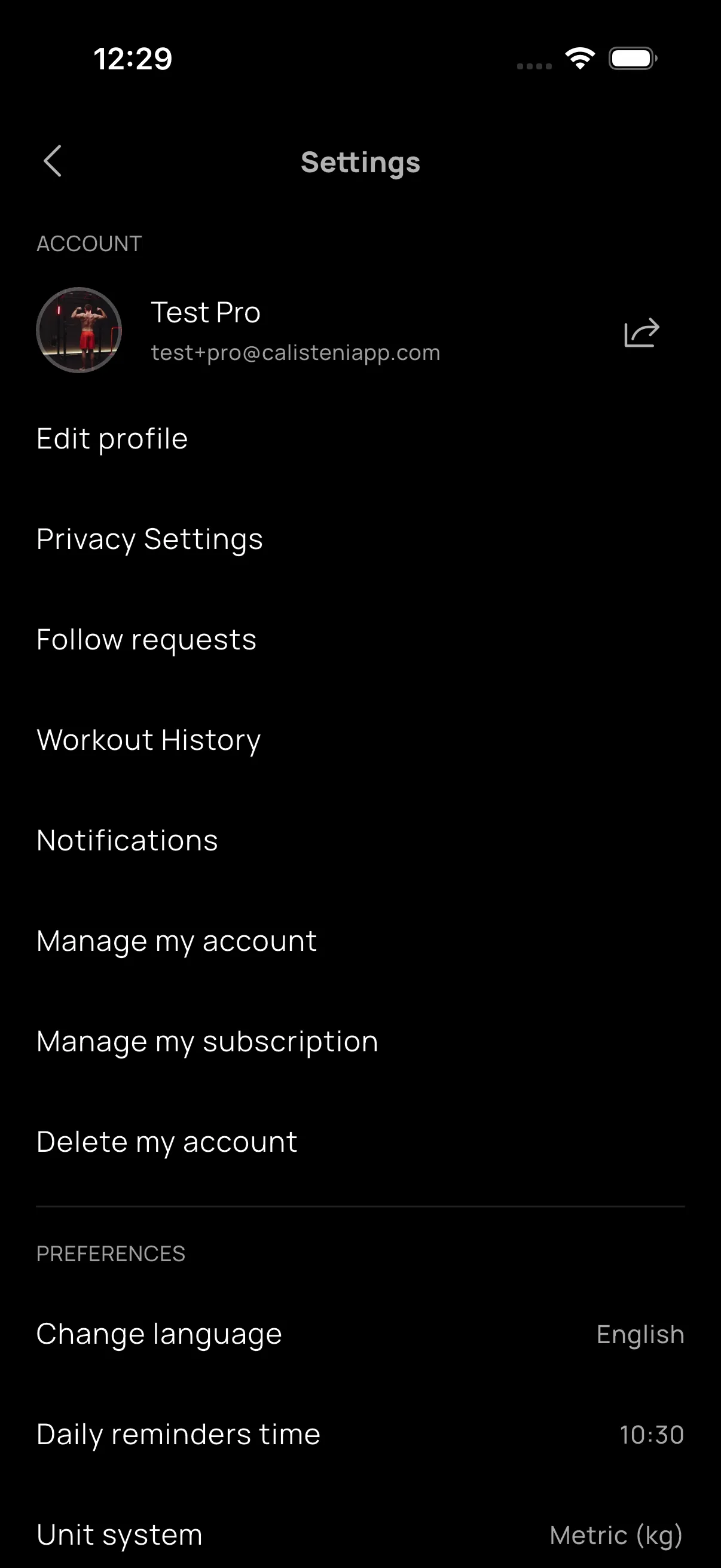
Accessing Settings
You can access the settings screen from the Profile tab by clicking the settings icon (gear) located in the top right corner.
Account
In the ACCOUNT section you will find everything you need to keep your profile up to date and shape your experience inside Calisteniapp.
Account information
At the top of this section, your email address associated with your Calisteniapp account is displayed. You can also share your profile from the icon button, making it easy for other people to discover your progress and activity.
Edit profile
From here you can refresh your profile in just a few steps. You can update your profile photo, your name, and your username so your account shows exactly how you want to appear in the community.
Privacy settings
In this section you can decide how you want your profile to appear. You can choose whether your account is public or private and select which information you want to show so you can share your journey your way.
Follow requests
If your profile is private, this access will appear here so you can review all pending follow requests and decide who can keep up with your activity.
Workout history
This gives you access to the complete list of your workouts so you can look back at your consistency, revisit past sessions, and keep celebrating everything you have already achieved.
Notifications
Manage the notifications you receive from the app so you never miss what matters and can stay in step with your progress. You can configure what types of notifications you want to receive, such as:
- New follower notifications
- Comments on your posts
- Workout reminders
- Marketing notifications
Manage my account
Access your account management options, including:
- Change your password
- Update your personal information
- View your account status
- Reset your password if you've forgotten it
For more information on how to reset your password, see the FAQs section.
Manage my subscription
Directly access your Pro subscription management options. From here you can:
- View your current subscription status
- Check the renewal date
- Access cancellation options
For more detailed information on how to manage your subscription, see the Manage my subscription page.
Delete my account
This option allows you to permanently delete your Calisteniapp account. Please note that this action is irreversible and will delete all your data, including:
- Workout history
- Created routines
- Progress and achievements
- Profile data
For more information on the account deletion process, see the Delete my account page.
Preferences
In the PREFERENCES section you can adapt the app to your routine and the way you like to train.
Change language
Select the language in which you want to use the app. Calisteniapp is available in the following languages:
- English
- Spanish (Español)
- Italian (Italiano)
- French (Français)
- German (Deutsch)
- Portuguese (Português)
The selected language will affect the entire app interface, including routine texts, exercises, and menus.
Reminder schedule
If you have a training program planned, here you can adjust the time when you want to receive reminder notifications. It is a simple way to fit your sessions into your day and keep your motivation moving forward.
Unit system
From this option you can choose the weight system that suits you best. You can switch between the international system in kilograms and the Anglo-Saxon system in pounds so your training always feels familiar and comfortable.
Theme
Choose how Calisteniapp looks: light theme, dark theme, or automatically follow your system settings. Train with an interface that fits the moment, from bright daytime sessions to focused night workouts.
Connections
In the CONNECTIONS section you can manage how Calisteniapp connects with other health and activity apps.
Here you can access the connection settings for services such as Apple Health or Google Health Connect to bring your information together and enjoy an even more complete experience.
Privacy
The PRIVACY section contains options related to the protection of your personal data.
Privacy policy
Access Calisteniapp's complete privacy policy, which details:
- How we collect and process your personal data
- What data we store and for how long
- Your rights regarding your personal data
- Information about cookies and tracking technologies
To read the complete privacy policy, visit the Privacy Policy page.
Tracking preferences
Manage the app's tracking and analytics options. You can control:
- Cookies and tracking technologies
- Behavior analytics
- Personalized advertising
- Sharing data with third parties
These preferences allow you to have control over how your data is used to improve the experience and personalize the content you see.
More
The MORE section contains additional help and support options.
Contact support
If you have any questions, technical issues, or need help, you can contact our support team. Available contact methods are:
- Email: info@calisteniapp.com
- Social media: Instagram @calisteniapp or Facebook Calisteniapp
For more information on how to contact us, see the Contact page.